
7 Signs Your Warehousing Business Has Outgrown Its CRM or Spreadsheets
Billing errors, inventory discrepancies, client trust issues? Discover the 7 signs your warehousing business has outgrown its CRM or spreadsheets.


 Jesse Lawrence

There is a great new Site Feature called Project Management in SharePoint® 2013 and for those that use a site per project, this is the feature for you!
This feature enables a number of different tools within your site, such as a task list, a calendar and a web part that is a visual timeline of the projects’ current state. This can be monumentally helpful when having to keep many different participants up-to-date about a specific project.
For those of you that are shouting 'I already use Project 2013!', this is not to be a replacement, but more of a Project 2013 feature enhancement, by making the work you do in project centrally accessible with no more tools than a browser and access to your SharePoint site. From this article you will be able to setup your own site with Project Management features and use Project 2013 to edit. Okay, let’s get down to business, assuming you already have a site, we’ll enable the Project Management site feature.
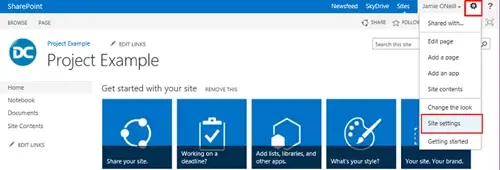
1) You will need to navigate to the Cog in the top right of the screen and select Site Settings:
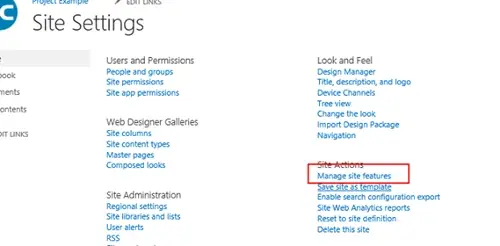
2) Then, select 'Manage Site Features', you will need to be at least a site administrator to have the permissions to do this:
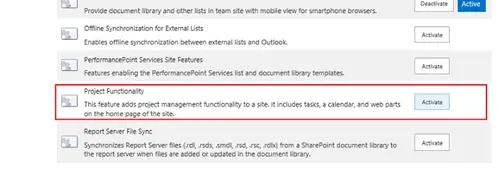
3) Activate the Project Functionality:
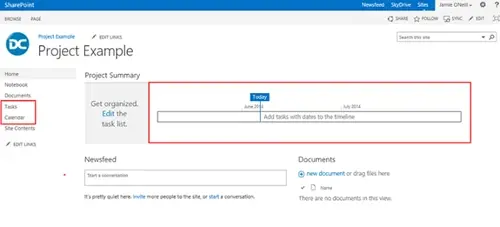
4) Now that you have the Project 2013 site feature enabled, you will find that the new web part has been added to your homepage and the new site task list and calendar have been added too. This feature can also be enabled in SharePoint Standard and SharePoint Enterprise.
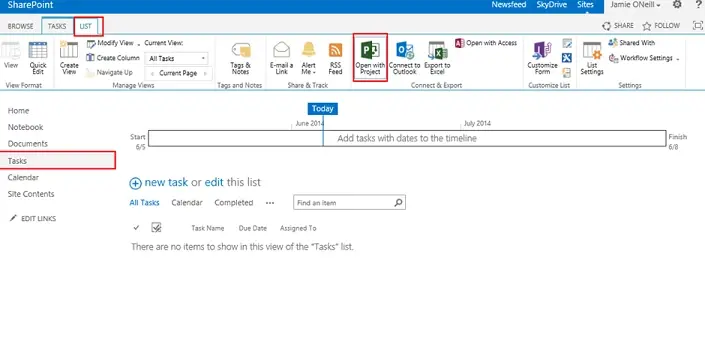
5) Using Project 2013 with this site is as simple as going to the task list that was created earlier, clicking List in the top left of the screen and selecting Open with Project 2013:
Please bear in mind that this was only Part 1. Want to see part 2? Keep checking back, or you can sign up to our mailer and we will e-mail you when Part 2 is published!
If you liked this blog article, check out other SharePoint related blog articles from Jamie & Phil!
Click the links below and don't forget to leave a comment.
SharePoint List Personal Views
Offline File Sync for Microsoft SharePoint using SkyDrive Pro
SharePoint 2013 Outlook Calendar Integration

Billing errors, inventory discrepancies, client trust issues? Discover the 7 signs your warehousing business has outgrown its CRM or spreadsheets.

Manufacturing businesses face daily pressures that standard CRM systems simply weren't designed to handle. Your teams need to manage complex product configurations, track quality standards, coordinate with suppliers, and maintain detailed production schedules whilst still nurturing customer relationships.

Microsoft Dynamics 365 Business Central includes customer relationship management features, but you might wonder if these tools are sufficient for your business needs.