
7 Signs Your Warehousing Business Has Outgrown Its CRM or Spreadsheets
Billing errors, inventory discrepancies, client trust issues? Discover the 7 signs your warehousing business has outgrown its CRM or spreadsheets.


 David Curd

We have customers running many different builds of NAV and of those many of them use the web client. It can be difficult to test development in the web client as while it is easy to create a middle tier using a different build on the same server (I use 2.2 in Gedas's blog here), doing the same thing with the web client is not well documented. However after some research we’ve found it can be done.
The IIS site that NAV creates when you run New-NAVWebServerInstance points at a folder in inetpub, C:\inetpub\wwwroot\DynamicsNAV90 in the example below:
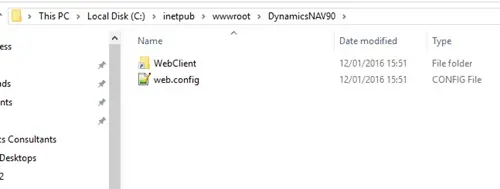
This folder contains what looks like a shortcut, but is actually a symbolic link or junction. When you open it, unlike a shortcut which would just opens the target, a symbolic link looks like you have just opened a folder in C:\inetpub\wwwroot\DynamicsNAV90, but it is actually showing the files in C:\Program Files\Microsoft Dynamics NAV\90\Web Client.
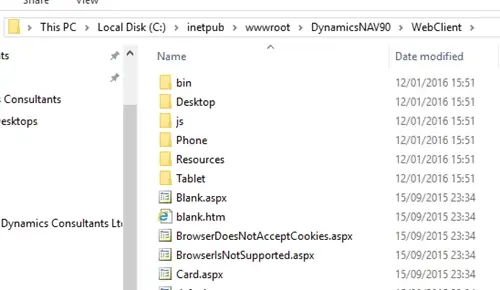
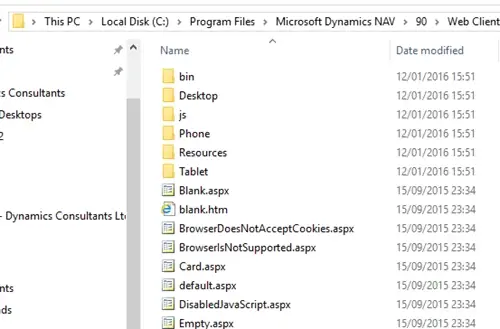
To make the web client use a different build of NAV you need to redirect this symbolic link. This can be done most easily using junction.exe from sysinternals. The whole process of creating the new web client site is as follows:
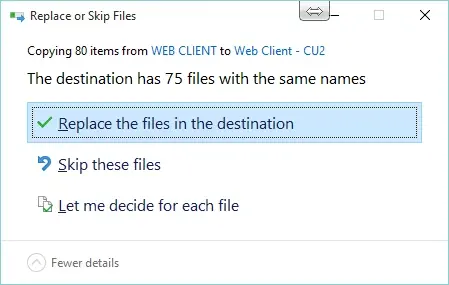
3. Create a new web client instance using the NAV Administration Shell eg “New-NAVWebServerInstance -Server localhost -ServerInstance DynamicsNAV90CU2Test -WebServerInstance CU2Test”
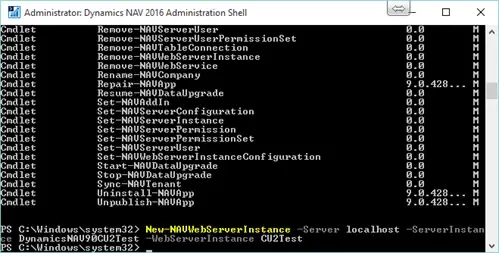
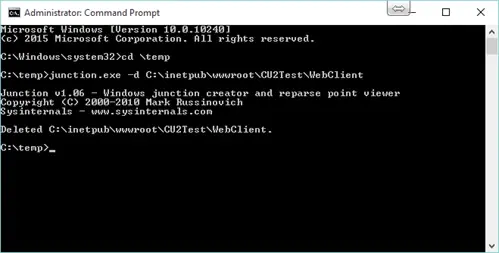
4. Delete the existing junction using “junction.exe -d C:\inetpub\wwwroot\CU2Test\WebClient”
5. Create the new junction pointing at C:\Program Files\Microsoft Dynamics NAV\90\Web Client - CU2 by running C:\temp>junction.exe C:\inetpub\wwwroot\CU2Test\WebClient "C:\Program Files\Microsoft Dynamics NAV\90\Web Client - CU2"

Billing errors, inventory discrepancies, client trust issues? Discover the 7 signs your warehousing business has outgrown its CRM or spreadsheets.

Manufacturing businesses face daily pressures that standard CRM systems simply weren't designed to handle. Your teams need to manage complex product configurations, track quality standards, coordinate with suppliers, and maintain detailed production schedules whilst still nurturing customer relationships.

Microsoft Dynamics 365 Business Central includes customer relationship management features, but you might wonder if these tools are sufficient for your business needs.