
7 Signs Your Warehousing Business Has Outgrown Its CRM or Spreadsheets
Billing errors, inventory discrepancies, client trust issues? Discover the 7 signs your warehousing business has outgrown its CRM or spreadsheets.


 Tom Hogben
Making Tax Digital (MTD) has been around a while now and since April 2022 has been a requirement for all VAT-registered businesses. It’s a fairly straight forward process and it seems our customers have gotten used to how it works and aren’t requiring much assistance with it anymore. Except one question that keeps popping up:
“How do I update my VAT Returns?”

If you prefer to follow one of our support team check out the video.
This has frustrated many a financial manager because although they know the return has been submitted and closed on the Government website, in Business Central it’s still showing as open.
Take this customer below. They have been running the process fine, using the “Get VAT Return Periods” button in the ribbon each time they need to pull a new period down from the Govt. Gateway. However, you can see all are marked as OPEN still, all the way back to 2020.
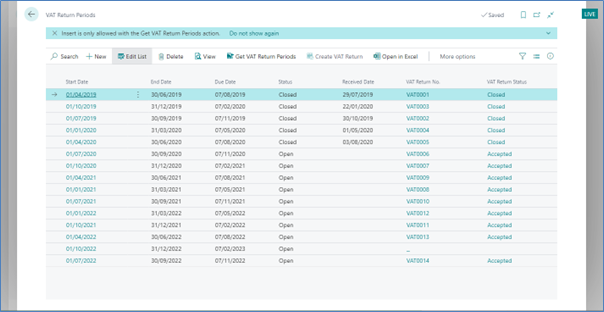
Again, this isn’t much of an issue, as they know they have actually been submitted and closed. But it’s just untidy.
The problem is the dates they are entering in when using the “Get VAT Return Periods” button. For this does more than it says on the tin. This will in fact update the statuses of existing periods IF the period is included in the date filter.
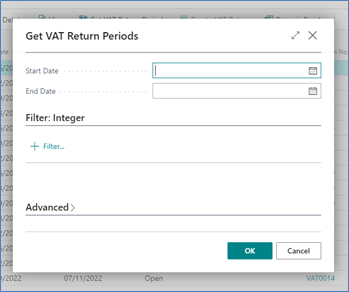
So, for the above customer, I would tell them to put a start date of 25/09/2020 and an end date of Today.
No new periods will be brought down, but it will update any existing periods that exist within that date range, thus marking all submitted ones as now closed.
If you need any more help Business Central, why not check out our Business Central Training Centre.

Billing errors, inventory discrepancies, client trust issues? Discover the 7 signs your warehousing business has outgrown its CRM or spreadsheets.

Manufacturing businesses face daily pressures that standard CRM systems simply weren't designed to handle. Your teams need to manage complex product configurations, track quality standards, coordinate with suppliers, and maintain detailed production schedules whilst still nurturing customer relationships.

Microsoft Dynamics 365 Business Central includes customer relationship management features, but you might wonder if these tools are sufficient for your business needs.