
7 Signs Your Warehousing Business Has Outgrown Its CRM or Spreadsheets
Billing errors, inventory discrepancies, client trust issues? Discover the 7 signs your warehousing business has outgrown its CRM or spreadsheets.


 Teresa Parker

If you need to search for any information relating to Totals in Microsoft Dynamics NAV, such as Totals within your Chart of Accounts, the optimum way is to use the “drill down” function.
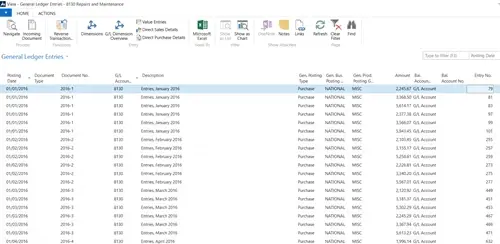
If you hover over a particular Total, it becomes underlined and it is then possible to click on it. For example, account 8130 – Repairs and Maintenance.
Having clicked on the Total, a new screen is shown displaying all of the transactions with their pertinent information for this particular figure for the said account. It is then possible to sort or filter the information displayed.
To find out more, hava a look at the related blogs:
Use the Search Function
Navigate
Screen Organisation

Billing errors, inventory discrepancies, client trust issues? Discover the 7 signs your warehousing business has outgrown its CRM or spreadsheets.

Manufacturing businesses face daily pressures that standard CRM systems simply weren't designed to handle. Your teams need to manage complex product configurations, track quality standards, coordinate with suppliers, and maintain detailed production schedules whilst still nurturing customer relationships.

Microsoft Dynamics 365 Business Central includes customer relationship management features, but you might wonder if these tools are sufficient for your business needs.