
7 Signs Your Warehousing Business Has Outgrown Its CRM or Spreadsheets
Billing errors, inventory discrepancies, client trust issues? Discover the 7 signs your warehousing business has outgrown its CRM or spreadsheets.


 Jesse Lawrence

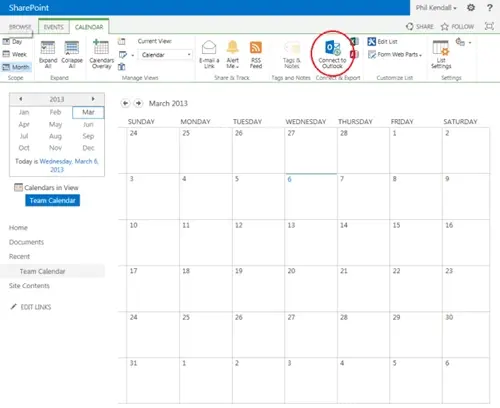
To connect your SharePoint 2013 calendar to Outlook (in this example I am connecting to Outlook 2010) all you have to do is click the ‘Connect to Outlook’ button in the Calendar ribbon.
You will then be prompted by Internet Explorer to allow the connection.
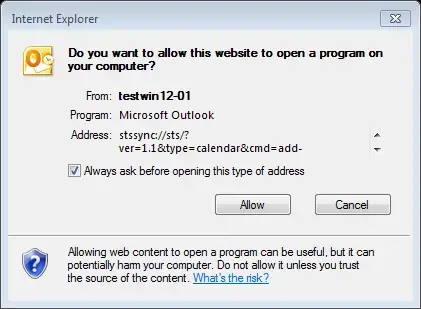
Click ‘Allow’. Then Outlook will ask you to confirm the connection too.
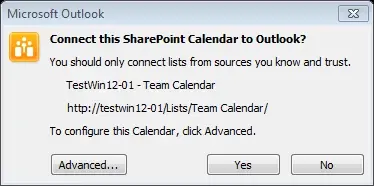
Click ‘Yes’. Outlook will then present the SharePoint 2013 calendar just like any other outlook calendar.
You can now work with the calendar from either Outlook or SharePoint and all your changes will be automatically synchronised between the two. For example, add an appointment in Outlook...
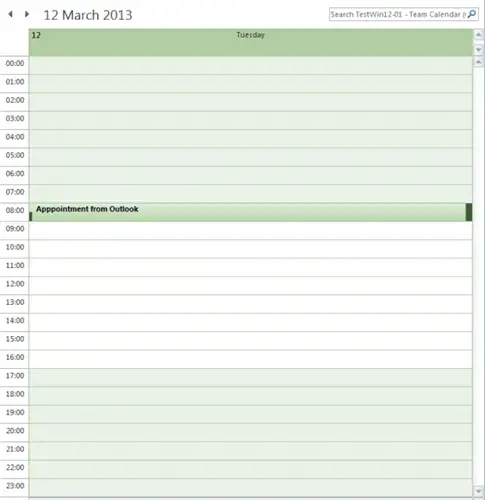
...and it will automatically appear in the SharePoint calendar.
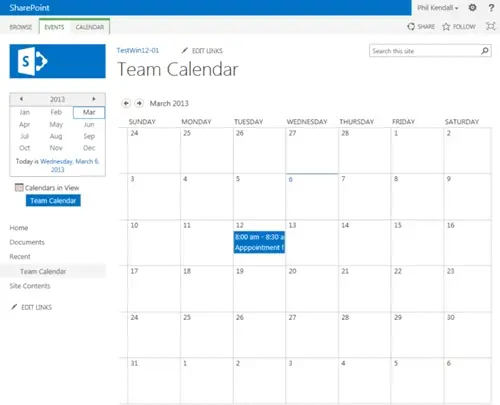
Likewise, any changes you or anyone else makes to the calendar from SharePoint will appear back in Outlook.
By connecting your SharePoint 2013 calendars to Outlook you can use the familiar and powerful Outlook calendar tools for keeping your calendar up to date. You can also view a SharePoint calendar side by side with an Outlook calendar or view it as an overlay. You can even copy events among SharePoint and Outlook calendars, without leaving Outlook.

Billing errors, inventory discrepancies, client trust issues? Discover the 7 signs your warehousing business has outgrown its CRM or spreadsheets.

Manufacturing businesses face daily pressures that standard CRM systems simply weren't designed to handle. Your teams need to manage complex product configurations, track quality standards, coordinate with suppliers, and maintain detailed production schedules whilst still nurturing customer relationships.

Microsoft Dynamics 365 Business Central includes customer relationship management features, but you might wonder if these tools are sufficient for your business needs.