
7 Signs Your Warehousing Business Has Outgrown Its CRM or Spreadsheets
Billing errors, inventory discrepancies, client trust issues? Discover the 7 signs your warehousing business has outgrown its CRM or spreadsheets.


 Teresa Parker
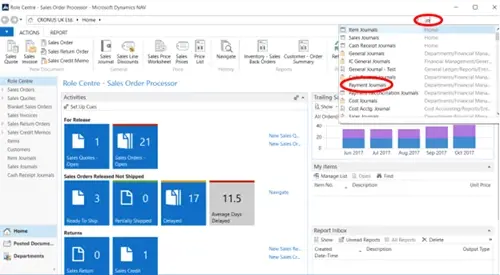
Sometimes it is necessary for a NAV user to find a page or view which they don’t use very often and therefore it isn’t displayed on their Role Centre. The search function within Microsoft Dynamics NAV is located in the top right hand corner of the screen and is an efficient way to find what you are looking for. To use this search function, all you have to do is type in what you are searching for.

As you type, potential answers and where they are located in the system are populated within the dropdown box and it is possible to select the report / page etc. from this list. The more you type the more accurate the search, resulting in a more precise list being displayed.
However, if you are unsure of the exact name of a particular page / view etc., typing in a relative term will return a list from the search from which you can select from. You do not have to type the whole phrase, just typing the first few characters of each word will return the desired results.
To find our more, have a look at the related blogs:
Drill Down
Navigate
Screen Organisation

Billing errors, inventory discrepancies, client trust issues? Discover the 7 signs your warehousing business has outgrown its CRM or spreadsheets.

Manufacturing businesses face daily pressures that standard CRM systems simply weren't designed to handle. Your teams need to manage complex product configurations, track quality standards, coordinate with suppliers, and maintain detailed production schedules whilst still nurturing customer relationships.

Microsoft Dynamics 365 Business Central includes customer relationship management features, but you might wonder if these tools are sufficient for your business needs.